
“Thanks to [Brand] for collaborating on today’s video” sounds friendly. It leaves the viewer to work out what the collaboration involved. Did the company pay for the video, send a free product, or offer commission on sales?
Say what the brand gave you, or how you earn from the recommendation. A line such as “[Brand] is paying for this part of the video” settles the question in a few seconds. Put that explanation with the recommendation. YouTube also requires its Paid promotion setting for branded content; the platform label doesn’t explain your particular deal.
This guide covers YouTube’s rules and US Federal Trade Commission (FTC) guidance. The FTC says US rules can apply to creators abroad when their endorsements foreseeably affect US consumers. For other countries, YouTube links to local advertising authorities.
Explain how you benefit from the recommendation
The FTC’s Endorsement Guides focus on connections that could affect how viewers judge your recommendation and that they wouldn’t reasonably expect. You need to explain the relationship, not reveal your fee or read contract terms on camera.
Here are three examples you can adapt. Replace [Brand] with the company’s name and choose words that match your deal.
1. A paid sponsorship segment
For a paid segment, introduce the sponsor as you begin that part of the video:
Spoken: “[Brand] is paying for this part of the video.”
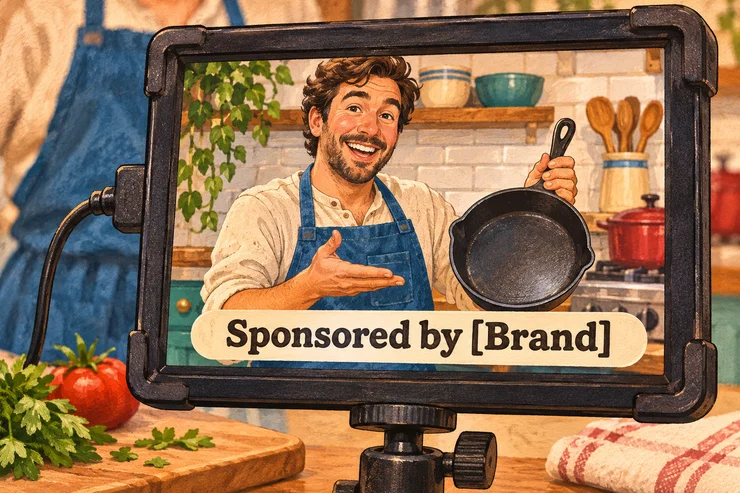
On screen: “Sponsored by [Brand]”
2. A free product or service
A brand can give you something valuable without paying a fee. If it sent you a pan to try and you decide to recommend it, explain that it was free. The same applies to perks such as a software subscription or a hotel stay.
Spoken: “[Brand] sent me this frying pan for free to try.”
On screen: “Free pan from [Brand]”
Mention the gift even if the brand never required a post and your opinion is entirely your own. “They let me say whatever I wanted” tells viewers about creative control. It doesn’t tell them who supplied the product.
3. An affiliate link or discount code
If purchases through your link or code earn you money, explain the commission. For a pan recommendation, you could use:
Spoken: “If you buy this pan through my link in the description, I earn a commission.”
On screen: “I earn a commission on purchases through my link.”
Beside the description link: “[Brand] pan: [URL]. I earn a commission on purchases through this link.”
The FTC’s affiliate guidance calls for disclosure in the video and near the links. “Affiliate link” or a discount code alone can leave viewers unaware that you get paid.
If you receive more than one benefit
A free pan and an affiliate link call for both facts: “[Brand] sent me this pan for free. I also earn a commission if you buy through my link.” If the company paid for the video too, say that. Calling it a gift would leave out the sponsorship payment.
Skip “This isn’t sponsored” in that situation. “They sent it for free, and I earn a commission” gives viewers the information they need without making them guess what you mean by sponsored.
Money and gifts aren’t the only connections. If you work for the company or own part of it, explain that when recommending its products.
If you bought a product yourself, have no brand relationship and don’t earn from the link, you can simply recommend it. You don’t need a “not sponsored” announcement for every independent purchase.
Put the disclosure right where you make the recommendation
If your recommendation uses both sight and sound, the disclosure should too. Say the line aloud and put readable text on screen. Someone watching with the sound off should still understand the relationship, as should someone listening while they cook.
Suppose your recipe video reaches a sponsored pan demonstration at minute eight. Put the disclosure at the start of that demonstration, where someone jumping to the segment will hear and see it. Then carry on cooking. For a whole sponsored review, introduce the relationship near the beginning. End credits arrive too late.
Keep the written commission explanation beside the relevant link, where viewers see both together. A buying link at the top and a disclosure beneath the description’s music credits are too far apart. For a group of affiliate products, put a commission statement immediately above those links and keep non-affiliate links separate. Our YouTube affiliate guide covers finding programs and creating those links.
For other formats:
- YouTube Shorts: Check your own on-screen text in the vertical player, where buttons, captions and video details compete for space. Leave enough time to read the sentence at a normal pace. The disclosure belongs in the Short itself, even if you also include it in the description.
- Livestreams: Viewers join throughout a stream and will miss a single announcement from the first minute. Repeat the spoken explanation during the sponsored content and keep a clear label visible throughout that portion of the stream. Include a disclosure in the stream description too.
Turn on YouTube’s paid-promotion setting in Studio
YouTube requires the paid-promotion declaration for videos containing branded content. That includes content influenced by a brand partner in exchange for value, such as payment or free products. It applies to Shorts and live streams as well as regular uploads.
For a video you’ve uploaded, turn on the disclosure label from a computer:
- Open YouTube Studio and select Content from the left menu.
- Click the video you want to update.
- Scroll down and click Show more.
- Find the Paid promotion section and select Yes.
- Click Save.
The setting adds a disclosure label at the beginning, so your minute-eight pan segment still needs its own explanation. It does not automatically switch off ad revenue: eligible videos can still earn through the YouTube Partner Program.
Use the declaration for a review of a product the brand supplied, even when there’s no fee. For an affiliate-only recommendation, our recommendation is to use Paid promotion too, while explaining that you earn from purchases. A normal store link that earns you nothing doesn’t, by itself, make your video a paid promotion.
Include the disclosure in the script you send the brand
Settle the wording before filming. Include the spoken line and on-screen label in the script the sponsor reviews, so they’re part of the agreed segment. If a brief only asks for a vague thank-you, propose a clearer version:
I’ll introduce the segment with “[Brand] is paying for this part of the video” and show “Sponsored by [Brand]” on screen. Then I’ll move into the pan demonstration. Here’s the transition in the script: [link].
If the brand asks you to remove it, offer clearer or shorter wording that still explains the deal. Keep the disclosure when trimming the final edit.
Before publishing, watch the finished upload on your phone with the sound off. Is the label readable, including when captions and playback controls appear? Then listen without looking: can you tell who supplied the product or pays you? Finally, open the description and check that a viewer can see the commission explanation beside the buying link.
Confirm the Paid promotion selection in Studio too. A clear sentence in the script only helps if it survives into the video viewers see.